
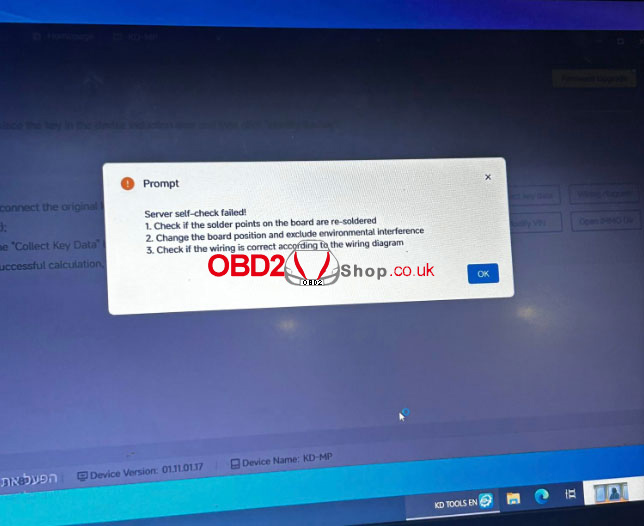
Problem Background: The KEYDIY KD-MP Tool typically reads original MLB keys without issues. However, users may encounter a specific failure during MQB48 data collection: the tool successfully reads the Key ID and begins the server upload process, but then terminates with a “Server self-check failed” error.
This usually indicates a synchronization issue between the local hardware reading and the server-side validation, rather than a standard network outage.
1. Verify Software Version (Crucial)
The most common cause for this error is outdated firmware or software. KEYDIY frequently releases patches to fix key-reading bugs.
Current Stable Version: V1.8.7 (Released Feb. 2026) or later.
Action: Ensure your KD-MP software is fully updated. This version specifically addresses MQB48 data collection stability.
2. Hardware & Wiring Inspection
If the software is up to date but the error persists after the tool reads the Key ID and uploads it to the server, check the physical connection:
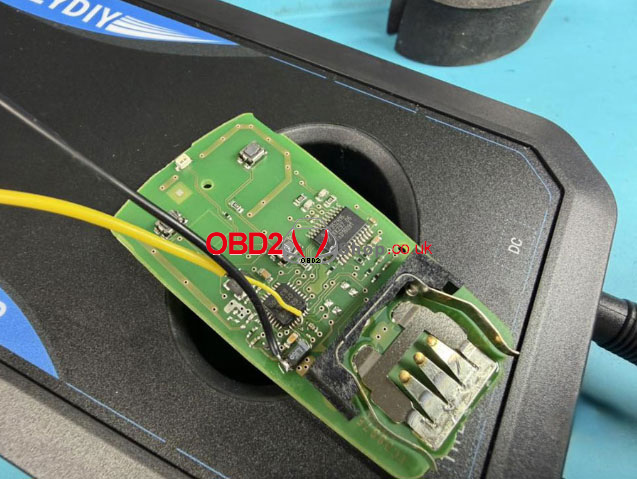
Solder Points: Inspect the board for cold solder joints. Whether you are using pogo pins or soldering wires directly, ensure all points are securely re-soldered according to the official pinout.
Wiring Accuracy: Cross-reference your physical connections with the official KEYDIY wiring diagram for the specific MQB48 module you are servicing.
3. Signal Interference & Positioning
Environmental factors can disrupt the high-frequency data collection required for MQB48.
Adjust Positioning: Change the position of the board or the KD-MP unit to exclude electromagnetic interference.
Environmental Check: Move the setup away from high-power electronic devices (such as WiFi routers or induction heaters) and large metal workbenches that may shield the signal.
Summary Checklist
| Step | Action | Resolution |
| 1 | Update Software | Ensure version is V1.8.7 or higher. |
| 2 | Physical Audit | Check solder/pin integrity and verify wiring |
| 3 | Reposition | Avoid metal surfaces & RF interference. |
Note: If the “Server Self-Check Failed” error persists after completing all the steps above, please contact KEYDIY Customer Service for further technical support.
Get Genuine KEYDIY Tools & Support
Ensure you are using authentic hardware to avoid compatibility issues. For the latest KEYDIY Key Programmers, software subscriptions, and official technical parts, visit our store: www.obd2shop.co.uk
