
To enable communication between the Topdon One Plus tablet and the vehicle, the ONE VCI must first be connected to the tablet either wirelessly (via Bluetooth or Wi-Fi) or via a wired USB connection.
1. Wireless VCI Connection
Two wireless methods are provided to connect the ONE VCI to the tablet: Bluetooth or Wi-Fi.
Method 1: Wi-Fi Connection
Note: Before establishing a Wi-Fi connection between the tablet and the VCI, ensure that the HOST mode is enabled under User Info > Settings > USB Mode Switch.
1. Tap Diagnostics, then the  icon in the upper-right corner of the screen.
2. Tap the desired VCI name from the Wi-Fi list.
Note: You can identify the VCI by the last four digits of its serial number.
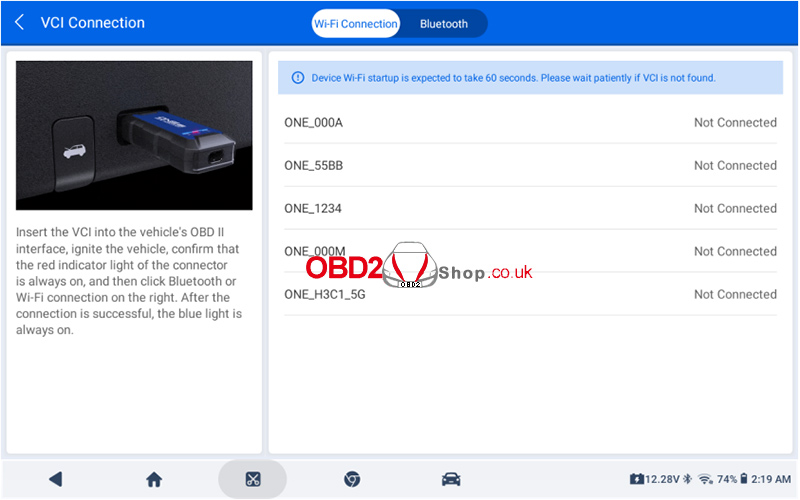
3. Once the wireless connection is established, the connection indicator on the VCI illuminates solid blue, and the icon  appears in the top right corner of the screen.
Note: To terminate the Wi-Fi connection, tap the VCI name from the list again.
Method 2: Bluetooth Connection
1. Tap Diagnostics, then the icon in the top right corner of the screen.
2. Tap the desired VCI name from the Bluetooth list.
3. Once the wireless connection is established, the connection indicator on the VCI illuminates solid blue, and the icon  appears in the top right corner of the screen.
Note: To disconnect, tap the VCI name from the list again.
2. Wired VCI Connection
The wired connection is established via a USB cable linking the VCI and the tablet.
Note: Before establishing a wired connection between the tablet and the VCI, ensure that the HOST mode is enabled under User Info > Settings > USB Mode Switch.
1. Use the USB cable (USB-A to USB-C) to connect the VCI and the tablet.
2. Once the wired connection is established, the connection indicator on the VCI illuminates solid blue, and the icon  appears in the upper-right corner of the screen.
Tips: Under normal conditions, once the ONE VCI is connected to the vehicle’s DLC and paired with the tablet, the VCI’s communication indicator will blink green, indicating a successful connection.
To switch to another VCI, tap the VCI icon in the upper-right corner of the screen and select the desired device from the list. The system will complete the switch automatically.
For more information, please contact www.obd2shop.co.uk.
